- Why "Best Platform" Is the Wrong Question
- All-in-One Platforms: What They're Actually Good For
- Budgeting and Guest List Tools
- Website and Registry Platforms
- Inspiration and Idea-Saving Tools
- Vendor Management Tools
- Mobile Experience Matters More Than It Sounds
- Customer Support and Community Matter More Than Expected
- Data Privacy Is Worth a Quick Check
- How to Actually Decide
- A Realistic Expectation Going In
- Platform Longevity Is Worth Considering
- Integrating Platforms With Each Other
- Revisiting Your Choice Partway Through
- Involving Your Partner in the Decision
- The Bottom Line
- FAQ
Comparing wedding planning platforms usually turns into a spreadsheet of feature checkmarks that doesn't actually answer the real question: which one will you still be using in month four. Here's a more honest way to think through it, by function rather than by brand name.
Why "Best Platform" Is the Wrong Question
Most comparison articles rank platforms as if one wins outright. In practice, wedding planning spans several genuinely different jobs, guest management, budgeting, a public website, saving inspiration, and very few platforms are excellent at more than one or two of them. The better question isn't "which platform is best" but "which platform is best at the specific thing I need help with."
All-in-One Platforms: What They're Actually Good For
Bundled platforms that combine a wedding website, registry, and guest list under one login are genuinely convenient if you want minimal setup and don't mind average performance across the board. The appeal is real: one login, one place to check RSVPs and update your registry. The tradeoff is that bundling rarely produces best-in-class results in every category, since building five things well is harder than building one thing well.

Budgeting and Guest List Tools
If numbers and logistics are your biggest pain point, look specifically at how a platform handles budget tracking and guest list management, not just whether it has those features listed. Some tools let you customize budget categories to match your actual spending, others force a rigid template that doesn't fit your wedding. Test this with your real numbers before committing, since a budgeting tool that fights your specific situation creates more work than a spreadsheet would.
Website and Registry Platforms
For the guest-facing side, prioritize how the website looks on mobile, since most guests will visit from a phone, and how straightforward RSVP collection is for guests who aren't especially tech-savvy. A beautiful desktop template that's clunky on mobile is a real functional problem, not a minor cosmetic one.
Inspiration and Idea-Saving Tools
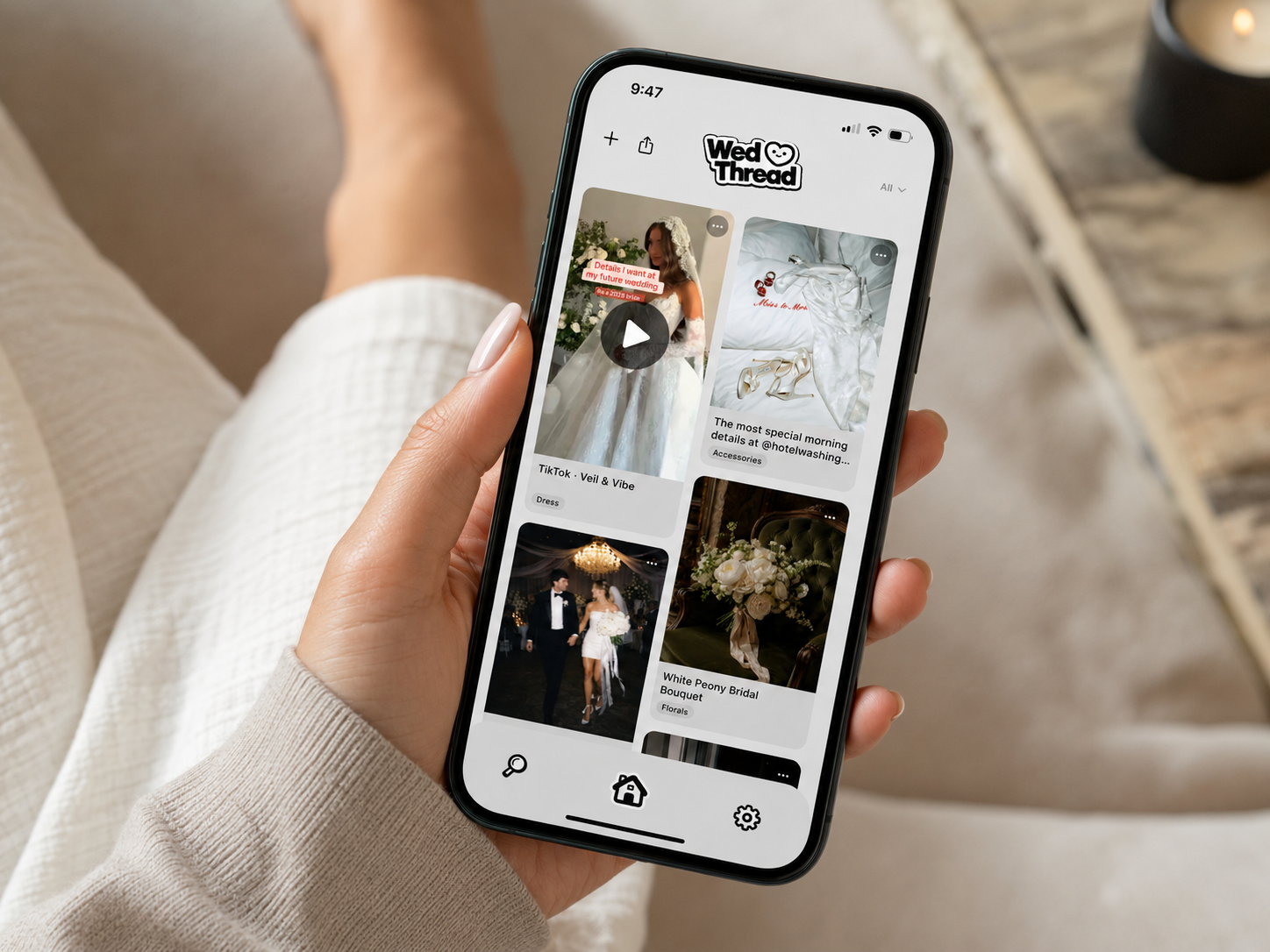
This is the category most all-in-one platforms handle worst, if they handle it at all. Saving visual inspiration, comparing florists, remembering why you liked one venue over another, is a fundamentally different job from tracking a budget line item, and it needs a tool built specifically for capturing things fast and organizing them automatically. WedThread is built for exactly this piece: saving from Instagram, Pinterest, TikTok, or anywhere else with a share button, plus camera roll screenshots, sorted automatically into categories like Venue, Florals, and Vendor. If your planning pain point is scattered inspiration rather than scattered numbers, this is the category to solve first, since it's the one general platforms consistently do worst.
Vendor Management Tools
Some platforms include a vendor contact and messaging system, useful if you want quotes and conversations centralized. Others leave this to email and text, which works fine if you're already disciplined about organizing vendor threads, but falls apart quickly if you're not. If vendor communication feels chaotic even early in planning, this is worth weighting more heavily in your comparison.
Mobile Experience Matters More Than It Sounds
A platform with a great desktop interface but a clunky mobile app is a real problem, since most day-to-day planning happens in small moments on a phone, waiting in line, on a break at work, not sitting at a desktop. Test any platform on your actual phone before committing, not just the marketing screenshots.
Customer Support and Community Matter More Than Expected
Beyond features, check how responsive a platform's customer support actually is, and whether there's an active user community for troubleshooting common issues. Wedding planning platforms often get heaviest use in short, high-stakes bursts, finalizing a guest list the week RSVPs are due, for example, and slow support during that window is a real problem, not a minor inconvenience.
Data Privacy Is Worth a Quick Check
Wedding planning platforms collect a fair amount of personal information, guest addresses, dietary restrictions, sometimes payment details for registries. Before committing to a platform, a quick look at its privacy policy is worth the five minutes, particularly for any platform handling guest contact information at scale.
How to Actually Decide
Write down your two or three biggest planning pain points before comparing anything. If it's numbers and logistics, prioritize platforms built around budgeting and guest management. If it's staying organized on the visual, idea-saving side, prioritize a tool built for that specifically, since it's rarely a strong feature of the bigger, more generalist platforms. Most couples end up combining two or three specialized tools rather than finding one platform that does everything well, and that's a completely normal outcome, not a planning failure.
A Realistic Expectation Going In
No comparison article, including this one, can tell you exactly which platform will feel right for your specific planning style. The honest approach is to trial two or three candidates briefly, actually enter some real data, a handful of guests, a rough budget, and see which one feels intuitive rather than which one has the longest feature list. Ten minutes of hands-on testing usually reveals more than an hour of reading comparisons.
Platform Longevity Is Worth Considering
Wedding planning happens over a long stretch, often a year or more, and it's genuinely disappointing to build months of data into a platform that shuts down, gets acquired, or changes its pricing model partway through. Established platforms with a longer track record carry less of this risk than brand-new apps, though newer tools sometimes offer better features specifically because they're not weighed down by legacy design decisions. Weigh this tradeoff based on how much you'd lose if a specific tool disappeared mid-planning.
Integrating Platforms With Each Other
Even if you land on two or three specialized tools rather than one all-in-one platform, look for ways they can work together rather than existing in complete isolation. Some tools support basic integrations, syncing a guest list between a website builder and an RSVP tracker, for example. Where integration isn't available, a simple habit, updating multiple tools in the same sitting rather than letting one lag behind, keeps everything roughly in sync without needing built-in technical integration.
Revisiting Your Choice Partway Through
It's fine to reevaluate a platform choice a few months in if it's genuinely not working, rather than sticking with a poor fit out of sunk-cost thinking. The earlier in planning you switch, the less data you have to rebuild, so if a tool consistently frustrates you, address it sooner rather than pushing through for months hoping it improves.
Involving Your Partner in the Decision
Whatever platform combination you land on, make sure your partner is actually comfortable using it too, not just you. A tool that only one person finds intuitive quietly becomes one person's job by default, which defeats the purpose of picking shared planning tools in the first place.
The Bottom Line
Pick tools based on your actual pain points, not the longest feature list, and don't be afraid to combine a few specialized ones rather than forcing everything into a single platform.
Platforms try to bundle multiple functions, website, registry, guest list, sometimes budgeting, into one login. Single-purpose apps do one job well. Neither is universally better, it depends on whether you want convenience of one login or the best tool for each specific job.
For couples who want minimal setup and don't mind average performance across categories, yes. For couples who care more about any one category being genuinely great, a combination of specialized tools usually wins.
Most have a free tier covering the basics, with paid upgrades for more storage, guest capacity, or design customization. Very few require payment just to get started.
Yes, though it's more work the further along you are. Guest lists and RSVPs are usually easy to re-enter. Saved inspiration is the hardest thing to rebuild from scratch, which is worth considering before committing fully to one platform's ecosystem.
Identify which 2 or 3 functions actually matter most to your planning, then evaluate platforms specifically on those, rather than comparing total feature counts. A platform with 20 features you'll never touch isn't better than one with 5 you'll use constantly.
Not in the all-in-one sense. It's built specifically for one function, saving and organizing wedding inspiration from anywhere, and does that one thing rather than trying to also handle guest lists, budgets, or your wedding website.