- The Short Answer
- What a Wedding Website Actually Does
- What a Planning Tool Actually Does
- RSVP Deadlines and Travel Info: Getting the Timing Right
- Why Combining Them Usually Falls Short
- Privacy Settings Are Worth Checking Before You Publish
- What to Actually Look For in a Website Builder
- What to Actually Look For in a Planning Tool
- What Happens If You Switch Platforms Mid-Planning
- How to Set Up Both Without Overlap
- A Few Common Mistakes to Avoid
- Keeping the Website Updated Through the Engagement
- The Simplest Way to Think About It
- FAQ
If you're searching "wedding planning website," you're probably trying to figure out whether you need one, and how it's different from the dozen planning apps that also show up in the same search results. Here's the actual distinction, because they're not the same thing, and most couples end up needing both.
The Short Answer
A wedding website is the public page you send to guests. A planning app or tool is the private system you use to actually organize the wedding behind the scenes. One faces outward, one faces inward. Confusing the two is the most common reason people end up frustrated with whatever they picked first.
What a Wedding Website Actually Does
Your wedding website is guest-facing. It holds your date, venue, RSVP form, travel and hotel info, and usually a registry link. Guests visit it once or twice, mostly to RSVP and check logistics before travel. It doesn't need to be fancy. It needs to be findable and accurate.
Most website builders are free or nearly free, and the paid tiers mostly buy you nicer templates, not more functionality. Unless you have strong opinions about design, the free tier usually covers everything a wedding website needs to do.
A good test for whether a website builder is actually worth using: pull it up on a phone and see how it looks. Most guests will visit from mobile, often while checking travel logistics on the go, so a template that looks great on a laptop but cramped or slow on a phone is a real problem, not a minor cosmetic one.
What a Planning Tool Actually Does
This is the private side: budgeting, vendor research, checklists, and the general chaos of comparing fifteen venues and forty florists before making a decision. None of this belongs on your public website, and none of your guests need to see it.
Planning tools split further depending on what they're built for. Some are built around numbers, budgets, guest counts, RSVPs. Others are built around the messier, more visual side of planning, saving ideas, comparing options, keeping vendor conversations straight. Very few do both well.
RSVP Deadlines and Travel Info: Getting the Timing Right
One thing that trips up a lot of couples: setting the RSVP deadline too close to the wedding date. Caterers typically need final headcounts 2 to 3 weeks out, which means your RSVP deadline needs to land at least a month before the wedding, earlier if you're expecting a lot of out-of-town guests who need to finalize travel first. If a meaningful chunk of your guest list is traveling, add hotel block info and a room booking deadline to the website early, ideally before save-the-dates go out, since guests booking flights want that information as soon as possible.
Why Combining Them Usually Falls Short
A handful of platforms try to bundle a website builder and planning tools into one product. In practice, this rarely works as well as it sounds. Website builders are optimized for a clean guest-facing page. Planning tools are optimized for your own process, which is messier and more personal. Building both into one interface usually means one side feels like an afterthought, typically the planning side, since that's the less visible half of the product.
Privacy Settings Are Worth Checking Before You Publish
Most wedding websites default to public, meaning anyone with the link, or in some cases anyone who finds it through search, can view it. Before sharing yours, check the privacy settings. Password-protecting the site, or at least keeping it unlisted from search engines, is worth doing if you'd rather not have your home address or travel dates for a destination wedding sitting on the open internet. It's a small setting most couples never think to check.
What to Actually Look For in a Website Builder
Keep the bar low here. You need clean RSVP collection, a way to list travel and hotel info, and a registry link. Photo galleries and custom domains are nice extras, not requirements. If a website builder is trying to also sell you a full planning suite, that's usually a sign the planning half isn't its actual strength.
What to Actually Look For in a Planning Tool
This depends entirely on which part of planning is eating your time. If it's the numbers, look for something built around budgeting and guest tracking. If it's the research and idea-saving, that's a different job entirely, one built around capturing things fast and finding them again later, not spreadsheets.
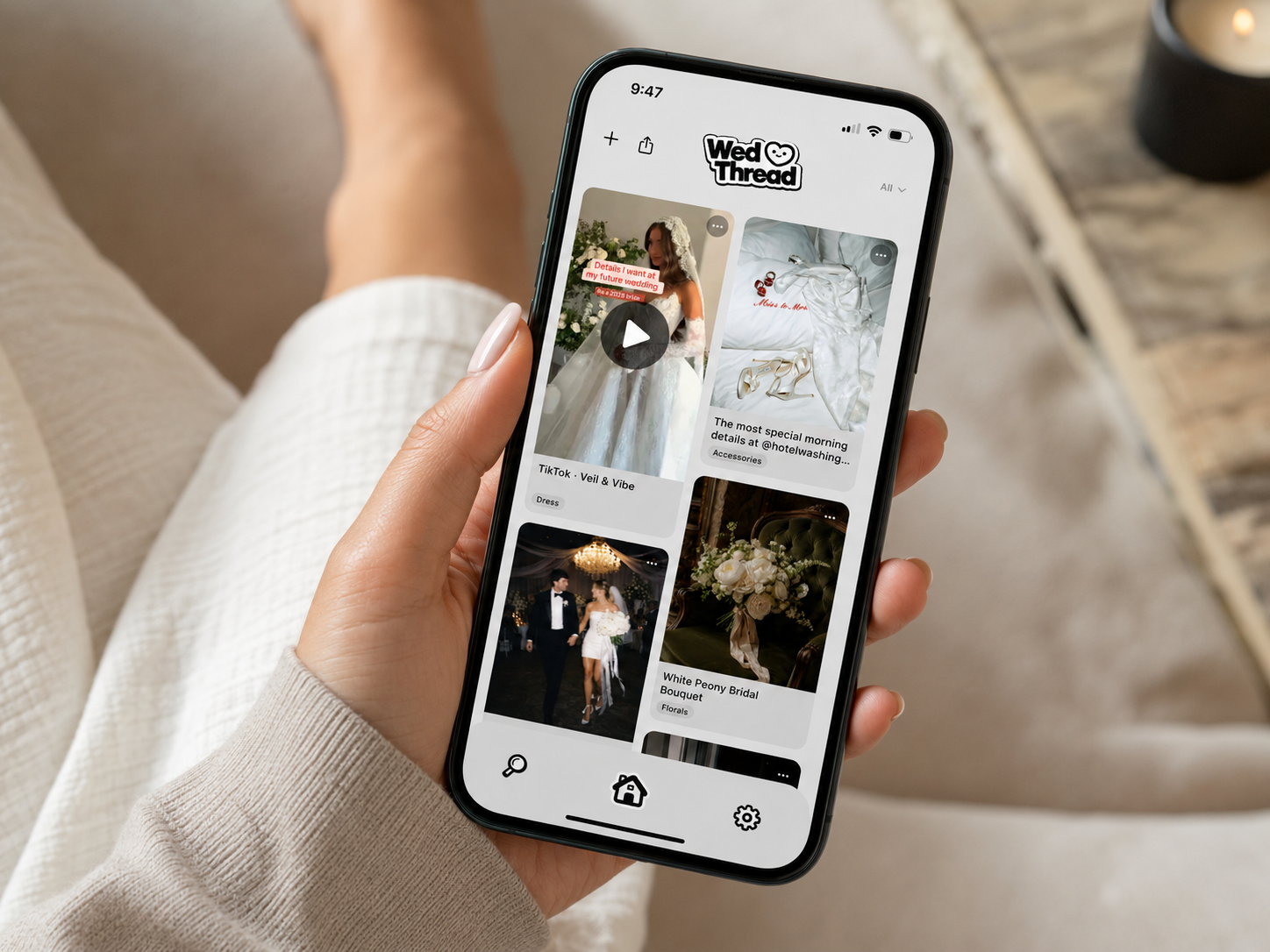
WedThread falls into that second category specifically. It saves wedding inspiration from Instagram, Pinterest, TikTok, or anywhere else with a share button, plus screenshots straight from your camera roll, and sorts everything automatically into categories like Venue, Florals, and Decor. If the messy, visual side of planning is what's actually overwhelming you, a website builder won't touch that problem at all, since it's not what website builders are for.
What Happens If You Switch Platforms Mid-Planning
It happens more than people expect, a website builder turns out to be clunkier than expected, or a planning app doesn't scale well once the wedding gets more complex. Before committing fully to either, check how easy it is to export or move your data. Guest lists and RSVPs are usually simple enough to re-enter manually if needed. Saved inspiration is the harder one to lose, since re-finding fifty saved ideas from scratch is a genuinely painful way to spend a weekend, which is one more reason it's worth picking the idea-saving side of your toolkit carefully the first time rather than treating it as replaceable later.
How to Set Up Both Without Overlap
Build your website first, since guests need it earlier than you'd think, save-the-dates increasingly link straight to it. Set up your planning tools in parallel, but keep them separate in your head: one is for your guests, one is for you. Trying to merge them into a single system usually just means neither one is doing its actual job well.
A Few Common Mistakes to Avoid
The most common one: building the website last, after everything else feels settled, and then rushing it out a week before save-the-dates need to go. Give it real time, even fifteen minutes is usually enough since the content itself is short. Second most common: forgetting to update it when details change, a venue swap or a new hotel block that never makes it onto the site guests already bookmarked. Set a reminder to double check the website whenever a major logistic changes, since guests won't know to ask if the old info is still sitting there looking current.
Keeping the Website Updated Through the Engagement
A wedding website isn't a one-and-done task, revisit it as details firm up, a finalized hotel block, an added event, updated RSVP numbers. Guests often check back more than once before the wedding, especially out-of-town guests planning travel, so an outdated site creates real confusion rather than just looking neglected.
The Simplest Way to Think About It
If you remember nothing else from this article, remember the core distinction: one tool faces your guests, the other faces you. Once that's clear, choosing the right combination of tools gets a lot easier.
Most couples do, mainly for RSVPs, travel info, and registry links in one place guests can find easily. It's less about needing it and more about how much it simplifies guest communication.
A wedding website is public-facing, for your guests. A planning app or tool is for you, the private, behind-the-scenes side: budget, ideas, vendors, checklists. They solve different problems, so most couples end up using at least one of each.
A handful of services bundle a website builder with basic planning tools, but they're rarely great at both. Website builders optimize for a nice guest-facing page. Planning apps optimize for organizing your own process. Combining them usually means compromising on one.
The essentials: date, venue, RSVP, travel and accommodation info, and registry links. Photos and your story are nice but optional. Keep it simple enough that a guest can find what they need in under a minute.
As soon as you have a date and venue, even if other details are still in progress. Save-the-dates increasingly link straight to it, so it needs to exist before those go out.
For most weddings, yes. Free builders cover RSVPs, registry links, and basic info fine. Paid tiers usually just unlock more design customization, not more function.
WedThread isn't a website builder at all. It's for saving and organizing the wedding inspiration you find on Instagram, Pinterest, and TikTok while you're planning, the private research side, not the public guest-facing page.